
With AI, the gap between designing and building keeps getting smaller. Working in the repository, turning a Figma flow into code to test an idea, fixing a screen detail without waiting for the next sprint: things that used to belong to the dev team are becoming part of designers' routine. I felt that market push too.
But a good prompt means turning the idea in your head into clear instructions. And even when the request is well written, the answer isn't always clear. Which files did Claude add, remove or change? How does that affect the project? And credits: does every task really need the most expensive model?
I didn't have those answers. Claude does tell you what it's doing, in the terminal and in the chat, but I watched the changes happen without understanding what they meant.
agent-crew was born out of that discomfort. It's an open-source plugin for Claude Code (VS Code, Cursor, JetBrains or the terminal) that takes care of both ends: it starts by really understanding what you want to build and ends by explaining what was done, at your level of experience. In between, each stage uses the right model for the job. In this post I share how the idea came up, how it evolved and a step-by-step guide so you can try it.
How the pipeline works
The idea came from reading how other people were working with agents. Instead of a loose request, they asked for a plan to be carried out in stages, each with its own agent. I tried that format on my own projects and built my own crew of agents, organized like a product team.
My pain was not understanding what was going on. I'd ask for a change, Claude would make it, and I'd end up with code that worked but that I couldn't explain. Reviewing it was impossible. And if something broke later, I wouldn't know where to start.
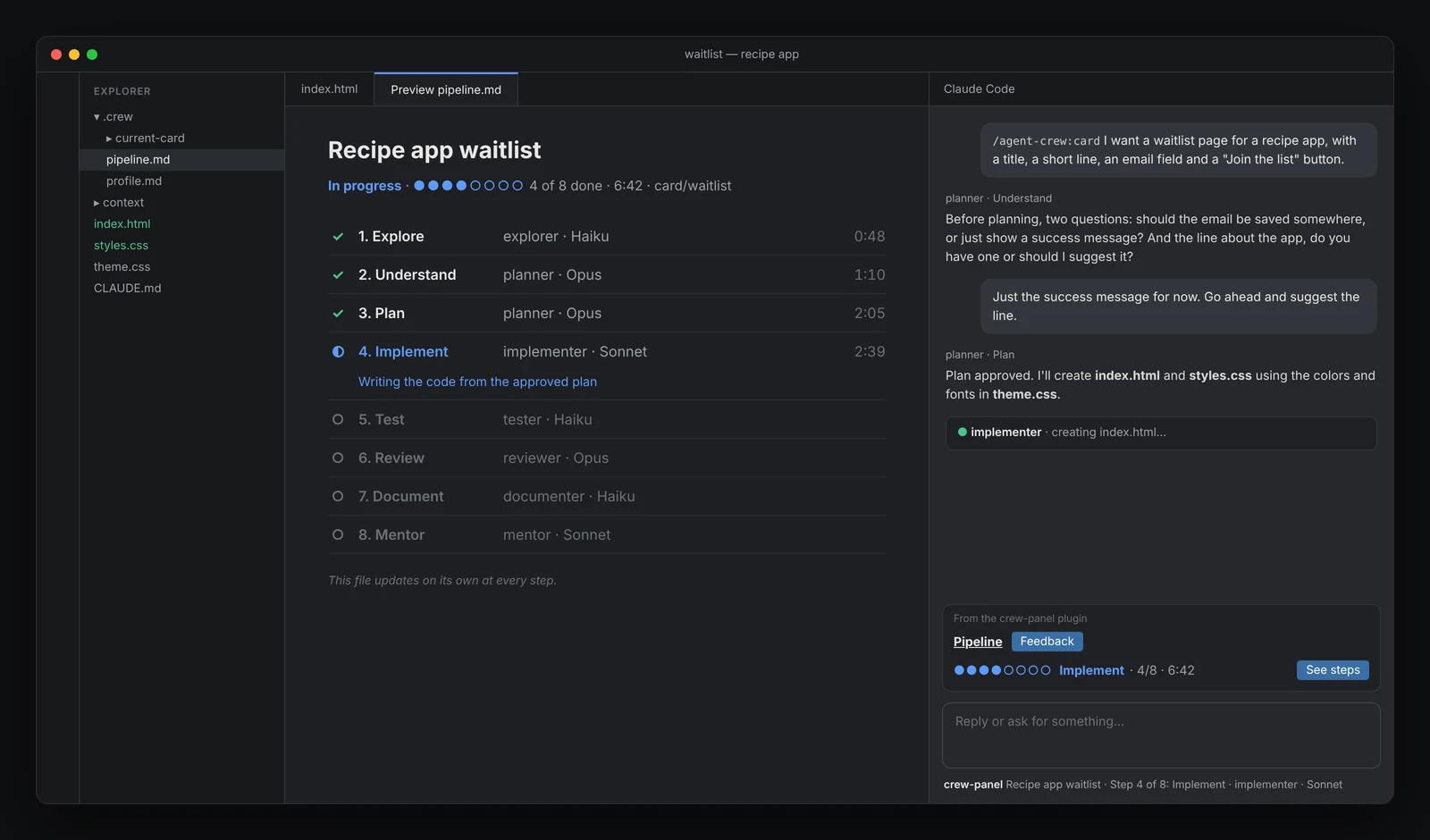
So agent-crew starts by showing the plan and only builds after you approve it. While it works, every stage shows up in the panel, so you know where the card is. At the end comes the mentor, which was what I missed most. Claude already tells you what it did, but in a programmer's language. The mentor translates which files changed, how and why, at your level of knowledge.
With that context, every card teaches me a bit of development. If you're already a dev, the same context helps you follow the changes without reading everything.
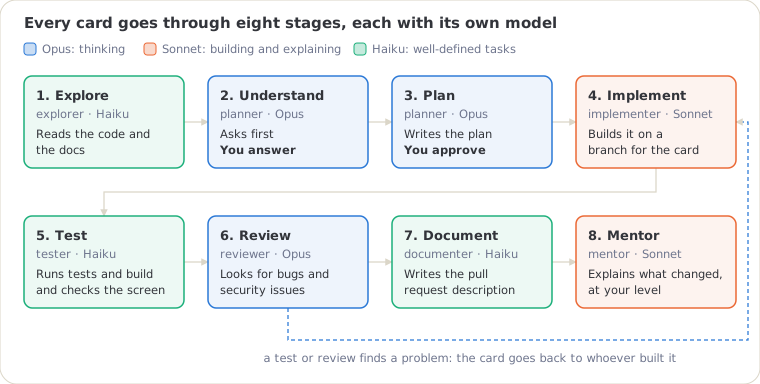
Every request becomes a card, which goes through eight stages.
Why use different models?
Claude has three model families.
- Opus reasons best, but it's the slowest and the most expensive.
- Sonnet balances quality and cost.
- Haiku is the fastest and the cheapest.
Using Opus for everything would be like asking the most senior person on the team to take screenshots. So it stays in the stages where a mistake is costly, like understanding the request, planning and reviewing. If one of them fails, everything else goes wrong. Sonnet builds and explains, following the plan Opus created and you approved. Haiku handles well-defined tasks, like reading the code, running the tests and writing the pull request description. If a model isn't available, the kit switches to a backup and lets you know in the panel.
Conversation is design too
Almost everything in agent-crew happens in a conversation. That's where I spent most of my design time.
It all starts with a quick setup, done once per project. The goal is to let the kit know who it's talking to, so it can adapt the explanations, the examples and the code. It asks about your preferred language, your level of experience with AI-assisted development, your field and the type of project. Any question can be skipped and changed later with commands like /agent-crew:set-level.
The design system the project should use is part of the setup too. It can come from Figma, an existing library or what's already in the code. If there's none, the kit builds a simple theme from your answers to four questions.
After the setup comes the part that solves the prompt pain. While the idea isn't 100% clear, agent-crew doesn't start writing code. Before planning, it lists what's still open in the request and asks. With your answers, it turns the idea in your head into a plan that makes sense, and that plan guides all the other agents.
How to try it
Use Claude Code wherever you like, in the Claude app, your IDE or the terminal. You don't need a GitHub account to use it.
To install, follow these steps:
Install. Open Claude Code in your chosen environment and paste:
Install agent-crew for me. In the terminal, run: claude plugin install agent-crew --marketplace akacaja/agent-crew
If that command doesn't work, first run "claude plugin marketplace add akacaja/agent-crew" and then "claude plugin install agent-crew@agent-crew".
At the end, tell me if it worked and what I need to do for the commands to show up.
The pipeline panel comes with it.
Open an empty folder. Create a folder just for the test and open Claude Code in it, for example
hello-test.Set up the project. Type
/agent-crew:start. The kit asks for your language, then your level, your field, the project type and the design system. You can skip any question.Run your first card. Describe the task after the command:
/agent-crew:card I want a waitlist page for a recipe app. It needs a title, a short line about the app, an email field and a "Join the list" button. Use the project's theme and make it work well on mobile.Answer and approve. The planner will ask questions and then show the plan. When the panel says "Waiting for you", it's your turn.
Read the mentor and see the result. At the end, it explains what was done and what to do next. To see the page working, ask:
Run the project locally and tell me how to open it in the browser.
Commands worth knowing
| Command | What it's for |
|---|---|
/agent-crew:card | Starts a new task |
/agent-crew:mentor | Asks for an explanation of what's going on |
/agent-crew:pause and /agent-crew:resume | Saves the card to continue another day |
/agent-crew:profile | Shows your settings and how to change each one |
/agent-crew:set-level | Changes how detailed explanations are (there's also set-language, set-area, set-project, set-design) |
/crew-panel | Opens the pipeline panel |
/crew-feedback | Sends your opinion about the kit |
Next steps
agent-crew is at version 0.9.6, and the idea is for it to evolve through real use. Every piece of feedback and every need that comes up can turn into a tweak or a new feature. So if you try it, tell me how it went.
Right in Claude Code, type /crew-feedback to leave a comment, no GitHub account needed. Or, if you prefer, open an issue in the repository explaining where you got stuck or what else you'd like the kit to do.